Password-protected and expiring links: when and how to use them
Most links should last forever. Two controls, a password and an expiry date, suit a few specific jobs. Here's when to reach for each, and how they fit with permanence.
Password-protected links
A password-protected link asks for a code before it redirects. Reach for it when a link shouldn't be openly shareable:
- A gated download or a draft you're sharing with a client.
- An internal resource you want behind one shared secret.
- A pre-launch page only certain people should see.
Anyone who knows the password can open the link and pass it on, so don't rely on it for sensitive data. After someone enters the password, their browser can open the link again for an hour without asking.
Expiring links
An expiring link stops working after a date or time you set. That's useful when access should end:
- A time-limited offer that shouldn't be redeemable later.
- A temporary file share.
- An event page that's irrelevant once the event has passed.
Why expiry is opt-in, never default
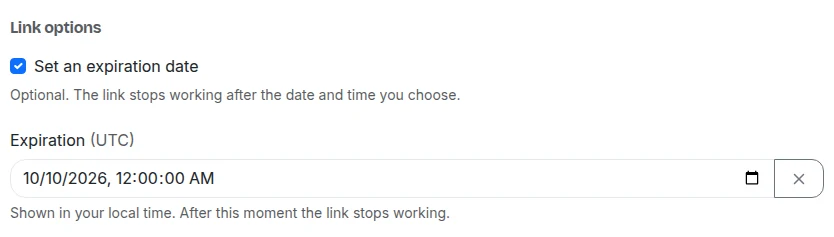
The danger with expiry is applying it by accident. A link on a printed flyer or in an old email must keep working, so on Urlicer, links in your workspace are permanent by default and only expire if you set a date on that link. Links made on the homepage without an account are the exception: they expire after 30 days unless you keep them in a workspace.
Setting them
Both are on Pro and up and live in your workspace. On the link's form, under "Link options", tick "Set an expiration date" or "Password-protect this link", either when you create the link or later. A CSV bulk import can also set them per row. The homepage form doesn't offer a password, and a link made without an account can't have one. See pricing.
Expiry and password protection are on Pro and up. Compare the plans, or start with a free account and upgrade when you need it.