How to track clicks on any link: a beginner's guide to link analytics
Put a link behind a short link and each click through it is counted, along with the country, the device and the site that sent it. Here's how to set that up and what you can learn.
Step 1: create a free account and shorten the link
Sign up (analytics are on every plan, free included), then paste your destination to create a short link. From that point on, every click through the short link is counted, and you don't add any tracking script to your site. Automated visits, such as the previews Facebook or Slack fetch when a link is posted, aren't counted; the dashboard shows how many there were. You can shorten a link on the home page without an account, but you can't open its dashboard, and the link expires after 30 days.
Step 2: open the analytics
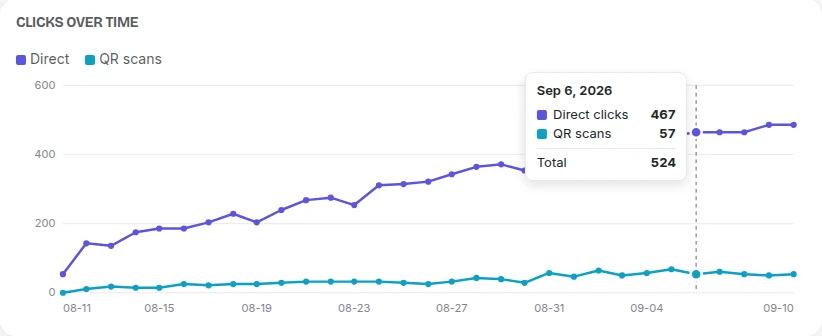
In your workspace, each link has its own dashboard. Instead of a bare "42 clicks", you get breakdowns:
- Clicks over time: spot the spike when your social post went out.
- Country: where your audience actually is.
- Device, browser and OS: mobile vs desktop, at a glance.
- Referrer: which site or app sent the click.
- QR scan vs direct click: so offline traffic, like a QR code on a poster, is counted separately.
Step 3: filter and save the view
Narrow to a date range or a single dimension, then save that as a named view so you can jump back to "last 30 days, mobile only" without rebuilding it. On Pro and up you can export a view to CSV.
Tag your campaigns for even more
Add UTM parameters to the destination before you shorten (the free UTM builder adds them for you), and your own analytics tool (like Google Analytics) can attribute the visit to the exact campaign, while Urlicer measures the click side.
Privacy by default
All of this is cookieless: no tracking cookie on your visitor, and the IP address is hashed rather than stored.
Ready to measure your links? Start with a free account. Links in your workspace never expire, and every one gets a QR code and click analytics.