Cookieless link analytics: track clicks without cookie banners
There's a common assumption that tracking clicks means cookies, and cookies mean a consent banner. For link analytics, the first part is wrong. A short link can count clicks and show where they came from without setting a cookie on anyone.
How link analytics actually works
When someone clicks a short link, the shortener has to redirect them anyway. That redirect is a server-side event, so the shortener can record what it needs right there on the server, with no script running in the visitor's browser, no cookie set on their device.
What you can measure without cookies
- Total clicks and clicks over time.
- Country, looked up from the IP address. Location stops at the country; there is no city.
- Device, browser and OS from the request headers.
- Referrer: which site or app sent the click.
- QR scan vs direct click, so you can attribute offline traffic.
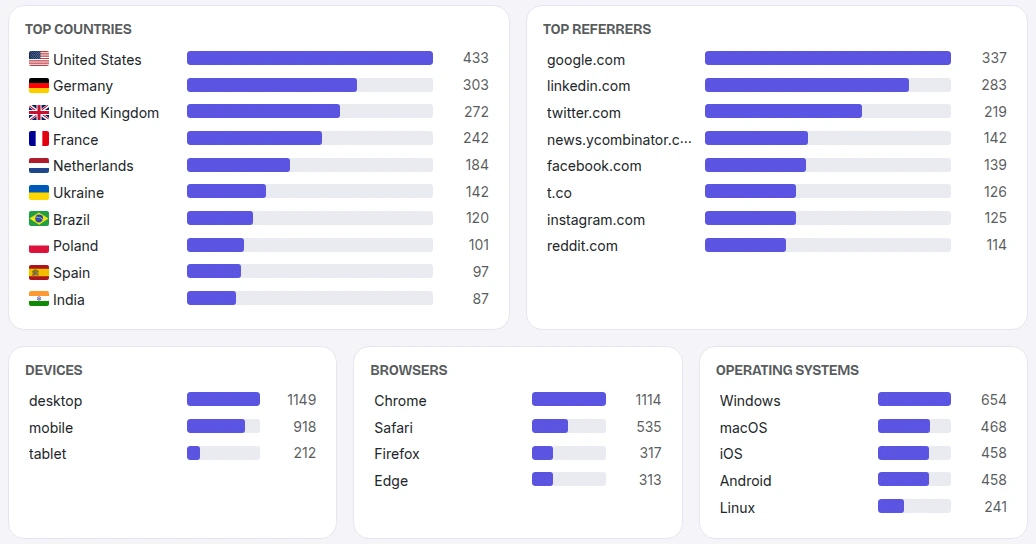
For a walkthrough of the dashboard, see how to track clicks on a link.
Privacy by design
A privacy-first shortener never stores the raw IP address. It stores a one-way hash mixed with a salt that rotates daily, so the same visitor can't be re-identified across days, and there's no persistent profile. No cross-site tracking, no advertising cookies.
Cookies and consent banners
Consent banners are mostly about non-essential tracking cookies. We set no cookies on your visitors, so a plain link adds nothing a banner would have to ask about. Two kinds of link are different: an A/B-tested link sets a 30-day cookie so a returning visitor sees the same variant, and a password-protected link sets a cookie once it has been unlocked. For the legal side, see GDPR and link tracking.
Urlicer is built this way: cookieless, IP-hashed, country-level analytics. Click history is kept for 30 days on Free, 90 on Pro, 365 on Team and 730 on Business (see pricing).
The opposite design exists, and you may be using it. A link from a free Bitly account can open a cookie consent dialog for hundreds of advertising partners and then an ad page before the destination, because the redirect itself is where the advertising is sold. What that looks like.
Want analytics without the banner? Start with a free account. Links in your workspace never expire, and every one gets a QR code and click analytics.
Weighing this against what you use now? How it compares with Bitly, plan by plan, including where the data is stored and why there is no cookie banner.
Want links that work this way? What a click on a Urlicer link stores, field by field, and what it leaves out.