Geo and device targeting: send visitors to the right page automatically
Sometimes one destination doesn't fit everyone. A visitor on a phone may be better served by your app-download page, and a shopper in Germany by your German store. Geo and device targeting lets one short link send each of them to a different page.
What you can route on
- Country: one two-letter country code per rule, such as US or DE. There are no regions, so covering the EU takes one rule per country. Anyone who matches no rule goes to the link's normal destination.
- Device: mobile, tablet or desktop.
- Operating system: iOS or Android, so a link can send iPhones to the App Store and Android phones to Google Play.
- Language: a two-letter code matched against the first language in the visitor's browser settings, so "de" covers both de-DE and de-AT.
How it works
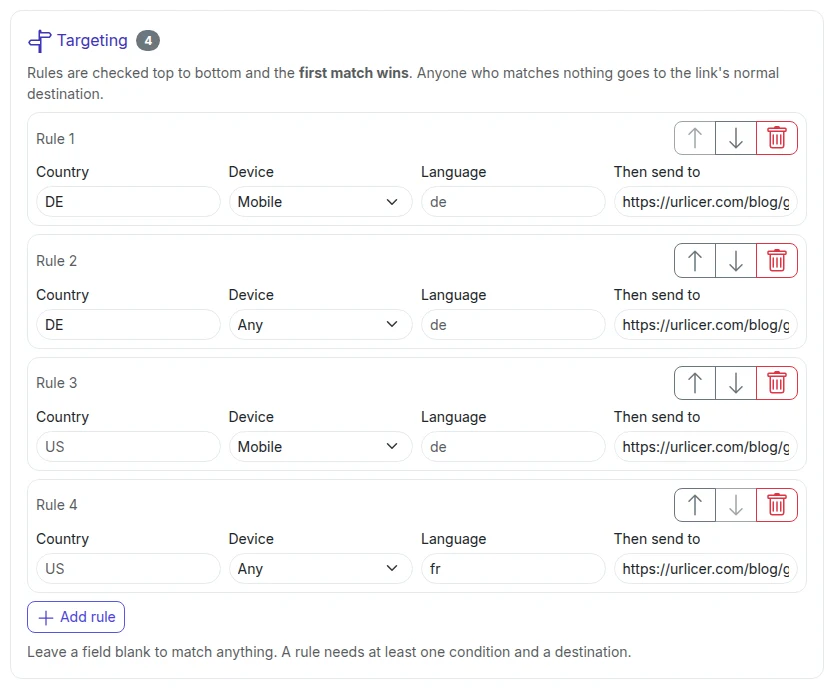
You add up to 20 rules to the link: "if country = DE, go here; if device = mobile, go there; otherwise the default." A rule can combine conditions, and all of them must match. Rules are checked in the order you set and the first match wins, so put "US and mobile" above "US". You can change the rules later without changing the link you shared.
Common use cases
- One app link in your bio that sends iPhones to the App Store, Android phones to Google Play and desktops to the web app.
- One campaign link that sends each country to its own store, including from a QR code on printed material.
- One support link that sends each country to its own help centre.
Privacy note
Country is derived from the visitor's IP at the moment of the click, at the country level rather than precise location, and Urlicer doesn't store the raw IP. It's the same cookieless approach as the analytics. Targeting is on the Team plan and up; see pricing.
Targeting is on the Team plan and up. Compare the plans, or start with a free account and upgrade when you need it.